In today’s multi-device world, managing peripherals like keyboards, mice, printers, and webcams across different computers can quickly become a tangled mess of cables. Unplugging and replugging devices is not only tedious but also wears out your ports. This is where a hub USB switch comes in, offering an elegant and efficient solution to streamline your workspace. If you’ve ever found yourself juggling peripherals between a work laptop and a personal desktop, this guide will show you how this clever gadget can revolutionize your setup.
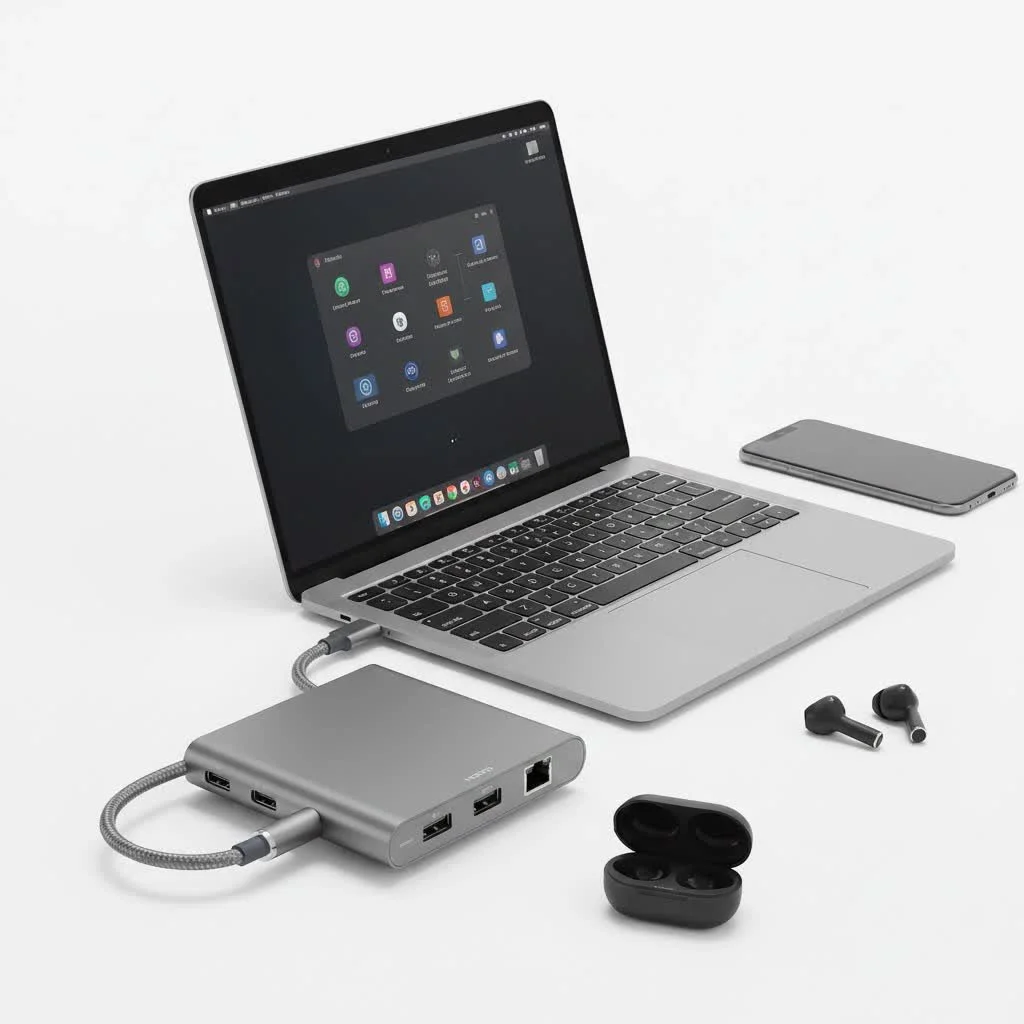
A hub USB switch, also known as a USB sharing switch, is a device that combines the functionality of a USB hub and a USB switch. It allows you to connect multiple USB peripherals to the device and then share them between two or more computers with the simple press of a button. Imagine controlling your desktop and your laptop with the same keyboard and mouse, or sharing a single printer without needing a network connection—that’s the power of a USB switch hub. For expert usb hubs reviews on this site.
What Exactly is a Hub USB Switch and How Does It Work?
At its core, a hub USB switch is a central point for your peripherals. It features several USB-A input ports for your devices (keyboard, mouse, external hard drive, etc.) and two or more USB-B or USB-C output ports that connect to your computers. A physical button on the switch or a hotkey command allows you to toggle which computer has active control over the connected peripherals.
The mechanism is straightforward. When you press the switch button:
- The connection to the first computer is electronically severed.
- A new connection is instantly established with the second computer.
- The second computer’s operating system recognizes the newly connected devices, and they become ready to use.
This process is typically seamless, taking only a second or two. More advanced models may also offer features like independent power supplies to support power-hungry devices like webcams and external hard drives, ensuring stable performance across all connected gadgets.
“A common misconception is that a USB hub and a USB switch are the same thing. While a hub expands one USB port into many for a single computer, a switch allows multiple computers to share one or more peripherals. A hub USB switch elegantly merges both, providing expansion and sharing in one compact device,” explains tech expert, David Chen.
The Key Benefits of Using a USB Switch Hub
Integrating a hub USB switch into your workspace offers significant advantages, especially for those managing multiple systems.
Major Advantages:
|
Our Picks for the Best USB Hub in 2026
As an Amazon Associate I earn from qualifying purchases.
|
||
| Num | Product | Action |
|---|---|---|
| 1 | Powered USB Hub, Wenter 11-Port USB Splitter Hub (10 Faster Data Transfer Ports+ 1 Smart Charging Port) with Individual LED On/Off Switches, USB Hub 3.0 Powered with Power Adapter for Mac, PC |

|
| 2 | Anker Laptop Docking Station Dual Monitor, 8-in-1 USB C Hub, 4K Dual Monitor with 2 HDMI, 1 Gbps Ethernet Hub, 85W Power Delivery, SD Card Reader for MacBook Pro, XPS and More (Charger not Included) |
|
| 3 | USB Hub 3.0, 7-Port USB Hub Splitter with Individual On/Off Switches and Lights, 3.2ft/1m Long Cable Compatible with MacBook, Laptop, Surface Pro, PS4, PC, Flash Drive, Mobile HDD |
|
| 4 | 13 in 1 USB C Docking Station - Dual Monitor, Triple Display, 8 USB C/A Ports, Ethernet, Audio - LIONWEI USB C Hub for MacBook,Dell,HP,Lenovo,Surface |
|
| 5 | P9R PRO USB C Hub Ethernet, 10 in 1 USB Docking Station 10Gbps with 4K@60Hz HDMI, USB C and 2 USB A 3.2, LAN, 2 USB A 2.0, PD 100W, SD/TF Ports, USB to Ethernet Adapter for PC, iPhone 16/15, Mac |
|
| 6 | UGREEN USB 3.0 Hub, 4 Ports USB A Splitter Ultra-Slim USB Expander for Mouse, Keyboard, Flash Drive, U Disk, Printer Compatible with Laptop, Desktop PC, Xbox, PS5, and More |
|
| 7 | 3-in-1 USB C Splitter, 3 in 1 Type-C Charging Data Cable Data Transmission Decive Charging Adapter Power Charger Equipment for ome Office Use, Fast & Efficient |
|
| 8 | USB C Docking Station with M.2 NVMe SSD Enclosure 10Gbps, 9 in 1 USB-C Hub, Type C SSD Slot with 4K@60Hz HDMI, USB 3.2 Gen2, PD100W, SD/TF Card Reader, Laptop Docking Station for Dell/HP/Lenovo/Mac |
|
| 9 | Anker USB Hub 4 Ports with 5Gbps Data Transfer, Multiple USB 3.0 Hub, USB Splitter for Laptop, Extender for A Port Laptop, PC, Desktop and More [Charging Not Supported](0.7 ft USB-A) |
|
| 10 | Powered USB Hub 10Gbps, intpw 9-Port USB 3.2 Hub, USB C Hub with USB A/USB C 3.2, 4 USB 3.0, 2 PD 45W Charging Ports, 65W Power Adapter and 3.3FT Cable, Aluminum USB Hub for Laptop, iPhone 17/16/15,PC |
|
- Clutter-Free Workspace: It eliminates the need for duplicate peripherals and the constant plugging and unplugging of cables. One set of devices for all your computers declutters your desk instantly.
- Cost-Effective: Instead of buying separate keyboards, mice, and printers for each computer, you can invest in one high-quality set and share it, saving you considerable money.
- Enhanced Productivity: Switching between computers becomes instantaneous. This is a game-changer for professionals who use a work laptop alongside a personal desktop or for developers testing on different operating systems.
- Port Protection: Constantly swapping cables can cause physical wear and tear on your computer’s USB ports. A switch minimizes this risk by keeping the connections stable.
Potential Downsides to Consider:
- Switching Delay: While usually fast, there can be a slight delay of 1-3 seconds as the new computer recognizes the devices.
- Power Limitations: Basic, bus-powered models might struggle to supply enough power for multiple high-draw devices. For setups with external hard drives or high-resolution webcams, a switch with an external power adapter is highly recommended.
- Compatibility Issues: In rare cases, certain peripherals or computers may have compatibility issues with specific switch models, though this is uncommon with modern devices.
Hub USB Switch vs. KVM Switch: What’s the Difference?
When researching USB switches, you’ll inevitably come across KVM switches. While they serve a similar purpose, there’s a key distinction. A KVM (Keyboard, Video, Mouse) switch allows you to share a keyboard, a monitor (video), and a mouse among multiple computers. A hub USB switch only shares USB peripherals and does not handle video signals.
When to Choose a Hub USB Switch:
You should opt for a USB switch hub if you use separate monitors for each computer or if your laptop and desktop are connected to different inputs on the same monitor. It’s the perfect tool for sharing everything except the display.
When to Choose a KVM Switch:
A KVM switch is the right choice if you want a single monitor, keyboard, and mouse to control multiple computers. It’s a complete all-in-one solution for sharing your entire workstation.
Here is a simple comparison to help you decide:
| Feature | Hub USB Switch | KVM Switch |
|---|---|---|
| Shares Video (Monitor) | No | Yes |
| Shares USB Devices | Yes (Multiple) | Yes (Typically limited) |
| Primary Use Case | Sharing peripherals between computers with their own displays. | Sharing a single set of peripherals and a monitor. |
| Cost | Generally more affordable. | Can be more expensive, especially for high-resolution video. |
How to Choose the Right Hub USB Switch for Your Needs
Selecting the best hub USB switch depends entirely on your specific setup and requirements. Here are the critical factors to consider before making a purchase.
1. Number of Computers and Peripherals
First, count how many computers you need to connect and how many peripherals you want to share. Switches typically support two or four computers. The number of USB ports for peripherals usually ranges from two to seven. It’s wise to choose a model with at least one or two more ports than you currently need to accommodate future devices.
2. USB Standard (USB 2.0 vs. USB 3.0)
The USB standard determines the data transfer speed.
- USB 2.0: Offers speeds up to 480 Mbps. This is perfectly adequate for standard devices like keyboards, mice, and printers.
- USB 3.0 (and higher): Provides significantly faster speeds, starting at 5 Gbps. This is essential if you plan to share devices that require high bandwidth, such as external SSDs, high-resolution webcams, or video capture devices. For most users, a USB 3.0 switch is the recommended, future-proof choice.
3. Power Source
USB switch hubs can be bus-powered or have an external power adapter.
- Bus-Powered: Draws power directly from the connected computer. Sufficient for low-power devices like a keyboard and mouse.
- Externally Powered: Comes with a dedicated power adapter. This is crucial for ensuring stability when connecting multiple devices or power-hungry peripherals like external hard drives, scanners, and high-end webcams.
4. Switching Method
The most common way to switch between computers is a physical button on the device. However, some advanced models offer a remote control or a software-based hotkey combination, which can be more convenient if the switch is placed out of easy reach.
Frequently Asked Questions (FAQ)
What is the primary purpose of a hub USB switch?
A hub USB switch is designed to allow two or more computers to share a single set of USB peripherals, such as a keyboard, mouse, printer, or webcam, without needing to unplug and replug cables.
Can I use a regular USB hub as a switch?
No, a standard USB hub can only expand the number of USB ports for a single computer. It lacks the internal circuitry required to switch control of the connected devices between multiple host computers.
Do I need to install any drivers for a USB switch hub?
Most modern hub USB switches are plug-and-play, meaning they do not require any special drivers or software to function. Your operating system (Windows, macOS, or Linux) should automatically recognize the device and the connected peripherals.
Will a USB switch introduce input lag for gaming?
For the vast majority of users and gaming scenarios, a high-quality USB 3.0 switch will not introduce any noticeable input lag. The switching process itself is nearly instantaneous, and once connected, the data transfer is as fast as a direct connection.
Can I connect a docking station to a hub USB switch?
While technically possible, it’s generally not recommended. Connecting a multi-function device like a docking station can sometimes create compatibility conflicts or power issues. It’s better to connect individual peripherals directly to the switch.
Conclusion
A hub USB switch is a small but mighty device that can dramatically improve your workflow and declutter your desk. By allowing you to seamlessly share your favorite peripherals between multiple computers, it saves time, reduces hassle, and protects your hardware from unnecessary wear. When choosing a model, be sure to consider the number of devices you need to connect, the required data transfer speed (USB 3.0 is a safe bet), and whether you need an external power source for stability. With the right hub USB switch, you can create a more efficient, organized, and productive multi-computer workspace.
Get our weekly buyer guide
Practical specs, not advice. Unsubscribe anytime.
I’ve been looking for a solution to share my keyboard and mouse between my work laptop and personal desktop without all the unplugging. This USB switch hub is a game-changer! It was super easy to set up, and now I just hit a button to switch control. My desk looks so much cleaner without the extra cables.
This device really helped streamline my workspace. I can now use my good webcam and printer with both my main PC and my secondary mini-PC without any hassle. The switching is instant, which is great for video calls. I just wish it had one more USB 3.0 port, but it’s still a solid buy.
Finally, a way to manage all my peripherals! I was tired of the tangled mess of cables and the wear and tear on my ports from constantly plugging and unplugging. This hub USB switch has made my life so much easier. My keyboard, mouse, and even my USB headset are all connected and shared seamlessly between my two machines.
The concept of a USB sharing switch is fantastic for my home office setup, especially for sharing my external hard drive. However, I noticed a slight delay when switching between my two computers, maybe a second or two. It’s not a deal-breaker, but it’s noticeable if you’re switching frequently. Still, it beats constantly swapping cables.