Choosing the best 4-port USB hub involves deciding between a powered (active) or unpowered (passive) model, primarily based on the power requirements of your connected devices. Powered hubs, with an external AC adapter, are essential for high-drain devices like external hard drives and webcams, ensuring stable performance and faster charging. Unpowered hubs, drawing power directly from the computer, are suitable for low-power peripherals such as mice, keyboards, and standard flash drives.
What is a Four Port USB Hub?
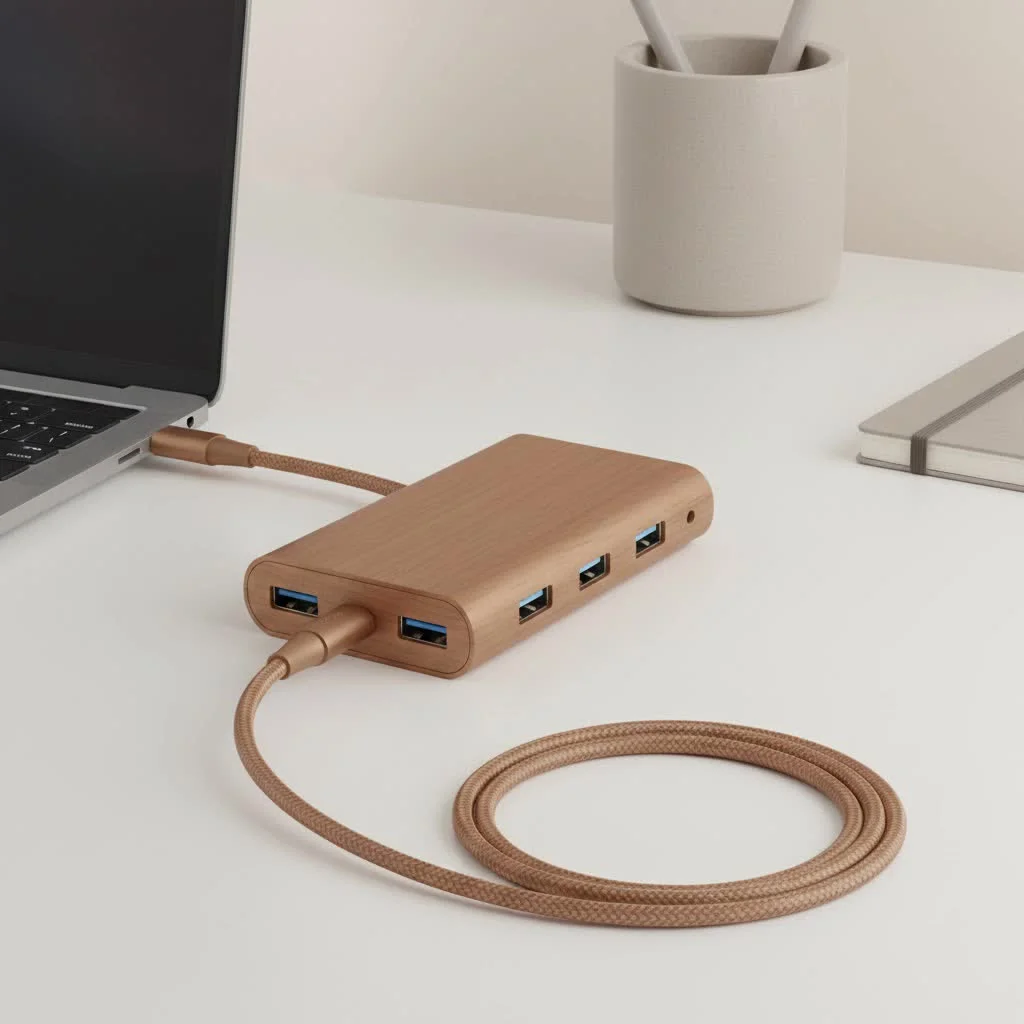
At its core, a four-port USB hub is a small device that expands a single Universal Serial Bus (USB) port into four. Think of it as a power strip for your data devices. You plug the hub into one of your computer’s USB ports, and instantly you have three additional ports available, transforming one connection point into a versatile docking station for your peripherals. For shop curated usb hubs on this site.
Why Four Ports is the Sweet Spot
While you can find hubs with ten or more ports, the four-port USB hub strikes an ideal balance between functionality and form factor. It offers enough expansion for the average user’s daily needs—keyboard, mouse, flash drive, and a charging cable—without becoming a bulky, desk-hogging accessory. It’s the perfect choice for both cleaning up a messy desktop and for tossing in a laptop bag for on-the-go productivity.
Key Features When Choosing a Four Port USB Hub
Not all hubs are created equal. Making the right choice depends on understanding a few key technical specifications that dramatically impact performance.
Powered vs. Unpowered: The Critical Difference
This is perhaps the most important decision you’ll make when buying a hub.
- Unpowered (Passive) Hubs: These hubs draw all their power directly from the computer’s USB port they are connected to. They are perfectly fine for low-power devices like a mouse, keyboard, or a standard flash drive. However, the total power is shared across all four ports, so they can struggle if you plug in multiple power-hungry devices.
- Powered (Active) Hubs: These come with their own external AC adapter that plugs into a wall outlet. This provides dedicated power to each port, ensuring that high-drain devices like external hard drives, webcams, or multiple smartphones can run simultaneously without issues.
As our lead tech specialist, Alex Carter, often says, “Choosing a powered hub is future-proofing your setup. You might not need the extra power today, but for stable performance with devices like external SSDs or for charging, it’s non-negotiable.”
USB 3.0 vs. USB 2.0: Speed Matters
The version of the USB standard a hub supports dictates its data transfer speed.
- USB 2.0: An older standard with a maximum transfer speed of 480 Megabits per second (Mbps). It’s sufficient for basic peripherals like keyboards and mice but will feel sluggish when transferring large files.
- USB 3.0 (and newer): Also known as USB 3.1 Gen 1 or SuperSpeed USB, it offers speeds up to 5 Gigabits per second (Gbps)—over ten times faster than USB 2.0. If you use external hard drives, SSDs, or frequently move large files, a USB 3.0 hub is essential. Most USB 3.0 ports are colored blue for easy identification.
Design, Build Quality, and Port Spacing
|
Our Picks for the Best USB Hub in 2026
As an Amazon Associate I earn from qualifying purchases.
|
||
| Num | Product | Action |
|---|---|---|
| 1 | P9R PRO USB C Hub Ethernet, 10 in 1 USB Docking Station 10Gbps with 4K@60Hz HDMI, USB C and 2 USB A 3.2, LAN, 2 USB A 2.0, PD 100W, SD/TF Ports, USB to Ethernet Adapter for PC, iPhone 16/15, Mac |

|
| 2 | UGREEN USB 3.0 Hub, 4 Ports USB A Splitter Ultra-Slim USB Expander for Mouse, Keyboard, Flash Drive, U Disk, Printer Compatible with Laptop, Desktop PC, Xbox, PS5, and More |
|
| 3 | Powered USB Hub 10Gbps, intpw 9-Port USB 3.2 Hub, USB C Hub with USB A/USB C 3.2, 4 USB 3.0, 2 PD 45W Charging Ports, 65W Power Adapter and 3.3FT Cable, Aluminum USB Hub for Laptop, iPhone 17/16/15,PC |
|
| 4 | USB C Docking Station with M.2 NVMe SSD Enclosure 10Gbps, 9 in 1 USB-C Hub, Type C SSD Slot with 4K@60Hz HDMI, USB 3.2 Gen2, PD100W, SD/TF Card Reader, Laptop Docking Station for Dell/HP/Lenovo/Mac |
|
| 5 | 13 in 1 USB C Docking Station - Dual Monitor, Triple Display, 8 USB C/A Ports, Ethernet, Audio - LIONWEI USB C Hub for MacBook,Dell,HP,Lenovo,Surface |
|
| 6 | Anker USB Hub 4 Ports with 5Gbps Data Transfer, Multiple USB 3.0 Hub, USB Splitter for Laptop, Extender for A Port Laptop, PC, Desktop and More [Charging Not Supported](0.7 ft USB-A) |
|
| 7 | 3-in-1 USB C Splitter, 3 in 1 Type-C Charging Data Cable Data Transmission Decive Charging Adapter Power Charger Equipment for ome Office Use, Fast & Efficient |
|
| 8 | Anker Laptop Docking Station Dual Monitor, 8-in-1 USB C Hub, 4K Dual Monitor with 2 HDMI, 1 Gbps Ethernet Hub, 85W Power Delivery, SD Card Reader for MacBook Pro, XPS and More (Charger not Included) |
|
| 9 | USB Hub 3.0, 7-Port USB Hub Splitter with Individual On/Off Switches and Lights, 3.2ft/1m Long Cable Compatible with MacBook, Laptop, Surface Pro, PS4, PC, Flash Drive, Mobile HDD |
|
| 10 | Powered USB Hub, Wenter 11-Port USB Splitter Hub (10 Faster Data Transfer Ports+ 1 Smart Charging Port) with Individual LED On/Off Switches, USB Hub 3.0 Powered with Power Adapter for Mac, PC |
|
A well-designed hub can make your life much easier. Look for a sturdy construction, often aluminum, which helps with heat dissipation. Also, pay attention to the spacing between the ports. Some hubs cram them so close together that you can’t use all four if you have wider USB plugs, defeating the purpose of the device. A hub with a flexible cable can also be more convenient than a rigid, stick-style hub, especially with laptops.
How to Choose the Right Four Port USB Hub for You
Feeling overwhelmed? Use this simple checklist to find your perfect match.
- Assess Your Devices: Make a list of everything you plan to connect. If it includes external hard drives, scanners, or devices you want to charge, you need a powered hub. If it’s just a mouse, keyboard, and the occasional flash drive, an unpowered hub will likely suffice.
- Prioritize Speed: Do you transfer large files, edit videos from an external drive, or back up your system regularly? If so, a USB 3.0 hub is a must-have. For basic connectivity, USB 2.0 is acceptable, but USB 3.0 offers much better value.
- Consider Your Workspace: Are you using it with a laptop on the go or a desktop at home? For travel, a compact, unpowered hub is convenient. For a permanent desktop setup, a powered hub with good port spacing will provide more reliability and flexibility.
- Read Reviews: Look for user feedback regarding reliability and longevity. A cheap hub that fails after a few months is no bargain. Focus on reputable brands known for quality electronics.
Frequently Asked Questions (FAQ)
Will a four port USB hub slow down my devices?
A USB hub has to share the bandwidth of the single port it’s plugged into. For low-bandwidth devices like a mouse and keyboard, you won’t notice any slowdown. If you’re transferring files from two external hard drives simultaneously through a USB 3.0 hub, you will be sharing the 5 Gbps bandwidth, so individual speeds might be lower than if they were plugged in directly, but it will still be incredibly fast.
Can I charge my phone with a four port USB hub?
You can, but the charging speed will vary. An unpowered hub will charge a phone very slowly, if at all. A powered hub will do a much better job, but for the fastest charging, look for a hub that has a dedicated “charging port” that complies with Battery Charging (BC) 1.2 specifications.
Are all the ports on a hub the same?
On most standard hubs, yes. All four ports will offer the same speed and power output. However, some models may feature one or two specially designated ports, such as a high-power charging port or a faster USB 3.1 Gen 2 port. Always check the product specifications.
Is it safe to leave a USB hub plugged in all the time?
Yes, it is perfectly safe. A quality USB hub is designed for continuous operation, just like any other computer peripheral. A powered hub will draw a minimal amount of electricity from the wall outlet when not in use.
Do I need to install drivers for a four port USB hub?
No, virtually all modern USB hubs are “plug and play.” This means your operating system, whether it’s Windows, macOS, or Linux, will automatically recognize the device and have it ready to use within seconds of you plugging it in.
Your Connectivity, Simplified
A four-port USB hub is more than just an accessory; it’s a vital tool for streamlining your digital life. By expanding your connectivity, it eliminates the daily frustration of port-swapping and helps create a more organized and efficient workspace. By understanding the difference between powered and unpowered models and choosing the right USB standard for your needs, you can select a device that will serve you reliably for years to come. Stop juggling cables and start enjoying the seamless connectivity you deserve.
Choose the Right Four-Port USB Hub
Follow these steps to select the ideal 4-port USB hub based on your device needs, speed requirements, and workspace setup.
List all devices you plan to connect. If you have external hard drives, scanners, or devices requiring charging, a powered hub is necessary. For low-power items like a mouse, keyboard, or flash drive, an unpowered hub will suffice.
Determine if you transfer large files, edit videos, or perform regular system backups. If so, a USB 3.0 hub is crucial for its 5 Gbps speeds. For basic connectivity, USB 2.0 is acceptable, but USB 3.0 offers superior value and performance.
Think about where you'll use the hub. A compact, unpowered hub is convenient for travel with a laptop. For a permanent desktop setup, a powered hub with ample port spacing provides greater reliability and flexibility for multiple peripherals.
Always check user feedback for insights into reliability and longevity. Investing in a reputable brand known for quality electronics can prevent issues with cheap hubs that fail prematurely after only a few months of use.
Get our weekly buyer guide
Practical specs, not advice. Unsubscribe anytime.
I picked up a 4-port hub for my laptop, thinking it would be enough for everything. While it works fine for my mouse and a basic USB stick, I tried charging my phone through it and it was super slow. I guess I should have gone with a powered one for anything that needs more juice. It’s okay for light use, but not for charging.
I finally got a powered 4-port USB hub after struggling with my external hard drive constantly disconnecting. This thing is a game-changer! It provides stable power, and now my hard drive and webcam work flawlessly without any hiccups. Definitely worth getting a powered model if you have high-drain devices.
I was always running out of USB ports on my desktop, and this hub solved that problem instantly. It’s great to have those three extra ports available. I’ve got my printer, a drawing tablet, and a card reader all connected now, and everything is working perfectly. It’s like a mini docking station for my peripherals.
This unpowered hub is perfect for my desk setup. I mostly use it for my wireless mouse, keyboard, and a flash drive, and it handles them all without any issues. It’s super compact and doesn’t add any extra cable clutter, which I really appreciate. Just plug and play, exactly what I needed.